Matthew Gonzalez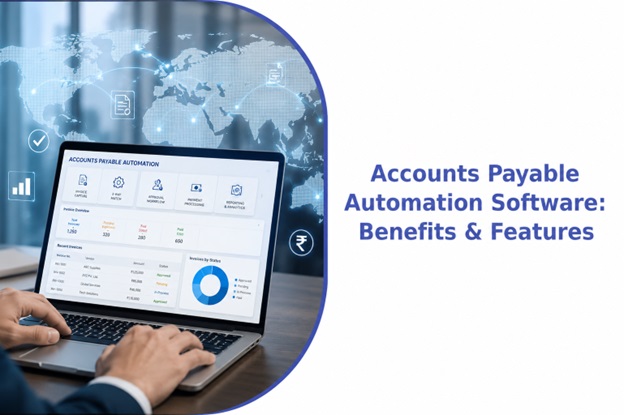
There’s a specific kind of frustration that comes from watching a finance team manually key in invoice data that should, by now, be handled automatically. It’s 2026. The technology exists. And yet plenty of businesses are still running AP the way they did a decade ago, invoices sitting in inboxes, approvals chasing people over email, someone cross-checking purchase orders by hand because that’s just how it’s always been done.
Accounts payable automation software exists to fix exactly this. But like most categories that get labeled “automated,” not every tool actually delivers on that promise. Some genuinely take the manual work off your plate. Others just digitize the paperwork and leave your team doing more or less the same amount of chasing they did before, just through a nicer interface.
What AP Automation Software Is Supposed to Do
At its core, accounts payable automation software handles the invoice lifecycle from the moment a bill arrives to the moment it’s paid and reconciled, without a person manually touching every step. That generally includes capturing invoice data, checking it against purchase orders and delivery records, routing it for approval, running compliance checks, scheduling payment, and keeping a clean audit trail of everything that happened along the way.
The difference between decent AP automation software and the kind that actually changes how your team works usually comes down to how well it handles the parts that don’t go smoothly, not the easy invoices, but the ones with a mismatch, a missing PO, or an unusual tax line.
Core Features Worth Actually Caring About
Invoice capture across formats. Vendors don’t send invoices the same way. Some email a PDF, some upload through a portal, some still send something that has to be scanned. Good software reads all of it accurately, not just the clean, templated invoices that make for a smooth demo.
Two-way and three-way matching. The invoice needs to be checked against the purchase order, and where relevant, the goods receipt too. When there’s a mismatch, the software should tell you exactly where the discrepancy is, not just flag the invoice and move on.
Smart routing for approvals. Invoices should move automatically to the right approver based on amount, department, or vendor, with clear escalation if someone doesn’t act in time.
Exception handling that actually resolves things. This is where a lot of AP software quietly falls short. When an invoice doesn’t match cleanly, the best systems either resolve it through defined rules or route it to someone equipped to make the call, rather than dumping it back into a queue your team has to sort through manually anyway.
Built-in compliance checks. For businesses in India, that means GSTIN validation, e-invoicing and e-way bill checks, TDS computation, and MSME payment timeline tracking, happening automatically as part of processing the invoice, not as a separate manual step.
Duplicate payment detection. One of the more expensive and preventable AP mistakes. Automated duplicate checks catch this before money actually moves.
ERP integration. The software should sit on top of whatever system you already run, SAP, Oracle, Tally, and post clean entries back, rather than requiring you to replace your system of record just to adopt it.
Real-time reporting and audit trails. Every decision the software made, and every decision a human made on top of it, should be traceable and explainable when an auditor asks.
The Actual Benefits, Once It’s Running Properly
When AP automation software is genuinely working, the impact is fairly noticeable. Invoices move from receipt to payment in days rather than weeks. Manual data entry drops significantly, which frees up finance staff for work that actually needs judgment. Duplicate and erroneous payments become rare instead of an occasional embarrassing discovery. Compliance checks happen consistently on every invoice, rather than depending on someone remembering to run them. Vendors get paid faster and stop chasing your team for status updates. And leadership finally gets a real-time view of payables instead of a picture that’s only accurate once a month.
Why Some AP Software Falls Short
The gap usually isn’t in what these tools can automate, it’s in what they leave behind. A lot of platforms are genuinely good at processing clean, straightforward invoices and genuinely weak at everything else. The invoice with a slight price variance. The one missing a PO reference. The one where the vendor’s GSTIN doesn’t quite match their registered details. These are exactly the invoices that eat up a finance team’s time, and if the software just flags them and stops there, you haven’t actually removed the manual work, you’ve just relocated it.
MYNDAPX: MYND’s Approach to AP Automation
MYND Integrated Solutions built MYNDAPX specifically around handling that harder 20%, not just the easy invoices. Clean invoices move straight through, captured, validated, matched against the PO and goods receipt, automatically. Anything that needs real judgment, a mismatch, a compliance flag, an unusual variance, gets routed to a MYND Integrated Solutions specialist rather than bouncing back to the client’s team unresolved.
Compliance is built into the process itself. GSTIN validation, e-invoicing, TDS, and MSME payment timelines run automatically before an invoice ever posts, designed specifically around how these requirements actually work in India rather than adapted from a generic global template. The platform sits on top of existing ERPs, SAP, Oracle, and Tally among them, so businesses don’t need to replace their system of record to use it. Pricing is based on invoice volume processed rather than the number of users logged in, and payment release and final sign-off always stay with the client’s own team, MYNDAPX prepares and proposes the payment run, but the business is the one that actually executes it.
For businesses that want the exceptions handled by people, not just flagged by software, MYND Integrated Solutions also offers this same platform as part of a fully managed accounts payable service.
Conclusion
Accounts payable automation software has genuinely matured, but the market is still full of tools that automate the easy 80% and leave the hard 20% right where it was. The real value isn’t in how fast a system processes a clean, well-formatted invoice, it’s in what happens the moment something doesn’t match, because that’s where most of the actual manual work in AP has always lived.
If you’re evaluating options, it’s worth pushing past the demo and asking specifically what happens to exceptions, how compliance is handled, and whether the software integrates cleanly with what you already run. That’s usually where the real differences between platforms show up, far more than in a features list.